
Skip to content
Evallo
PricingDemo
Sign in Start free trial

Capture

  • AI CaptureTurn a message into an opportunity
  • Your Evallo email address PlannedRecruiter emails, filed for you
  • Calendar syncInterviews land on the right role

Organize

  • PipelineEvery role from Applied to Offer
  • People and historyRecruiters, notes and every update

Prepare

  • Interview briefingsWhat to ask, from your own notes
  • Company research PlannedThe basics before your call
  • A résumé for every role PlannedTailored and reviewed before it goes

Follow through

  • AI SuggestionsYour next best step, from your notes
  • Today and follow-upsWhat's due across every role
  • Debrief after the callSay how it went; Evallo files it
  • Send from Evallo PlannedReply without leaving the role

Decide

  • Offer comparison PlannedMore than base and OTE

Offer accepted

  • Wins log PlannedYour record for reviews and raises
  • Recruiter networkStay in touch between searches
  • Market-value check-ins PlannedAre you still paid fairly?
On your phoneWhat's next between meetings
Private by designYour search stays yours
Explore the demoPricingSee the whole product →
Pricing Demo Sign in

Capture

AI CaptureCalendar sync

Organize

PipelinePeople and history

Prepare

Interview briefings

Follow through

AI SuggestionsToday and follow-upsDebrief after the call

Offer accepted

Recruiter network
Planned
Your Evallo email addressCompany researchA résumé for every roleSend from EvalloOffer comparisonWins logMarket-value check-ins
See the whole product →
Sales professionalsCareer coachesOutplacement firmsUniversitiesRequest a demo
Help Center
Start free trial

7-day Pro trial · No credit card required

Help Center
/
Email us
Help Center/AI and Capture

Add a role from a recruiter’s message

Paste the message, check what Evallo found, and save it as a role.

Every planAI reading on Pro and the trialDesktop and phone

Steps

  1. Copy the message.A recruiter’s email or LinkedIn message, a job post or your call notes all work.
  2. Open Paste a message.Desktop Press + at the top of the sidebar, or ⌘K, then Paste a message.Phone Tap + at the top of the screen, then Paste a message.
  3. Paste it, choose where it came from, and press Review.LinkedIn, Email, Text or Other.
  4. Check what Evallo found.The company, the role, the recruiter, a meeting and a task. Tick what you want and fix anything that’s wrong.
  5. Choose where it goes, then Save.A new role, or one you already track. Nothing is added until you save.
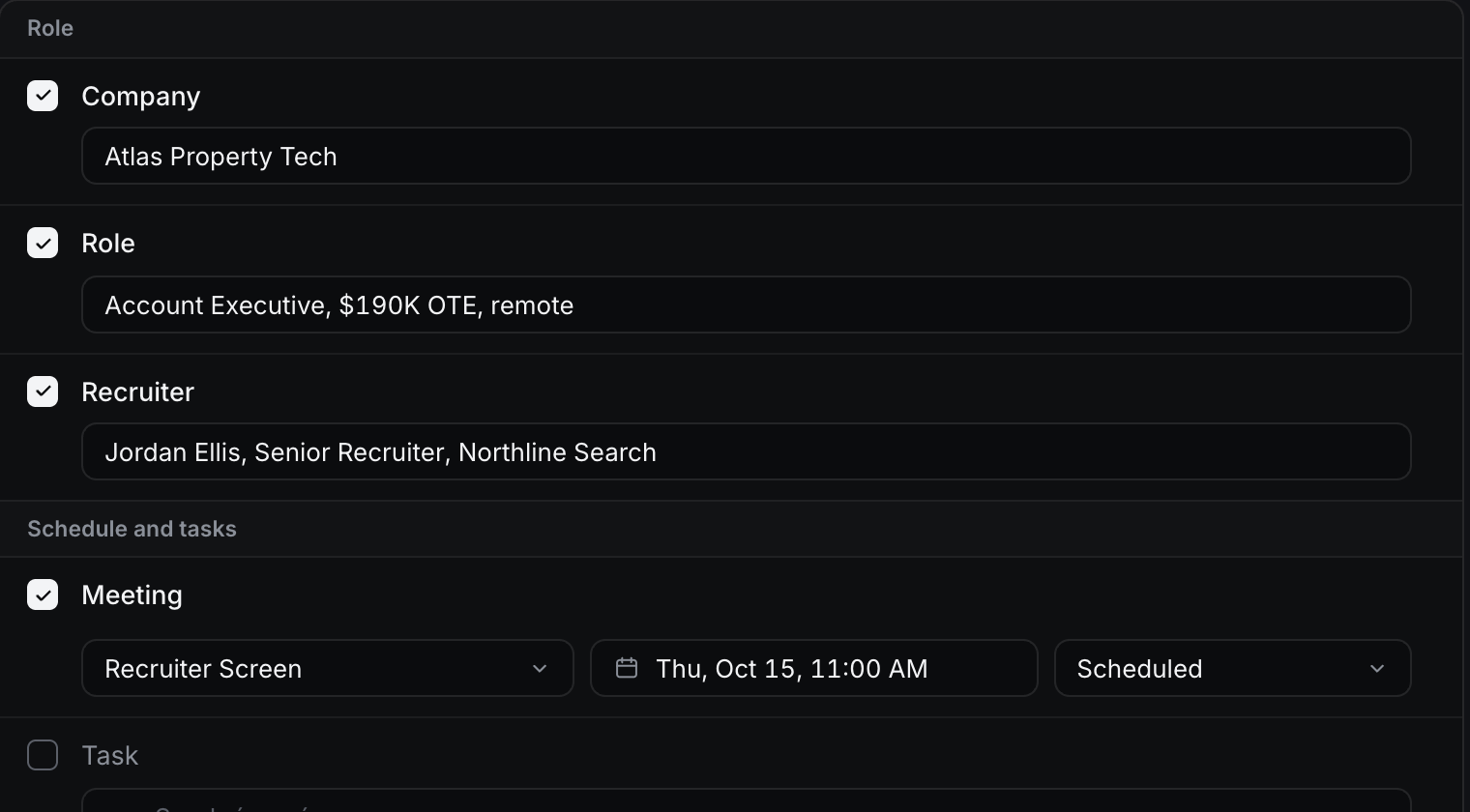
The review step: company, role, recruiter and a meeting found in a recruiter’s message, each with a checkbox
Step 4: everything Evallo found, ready to check. Example with made-up data.

Why it works this way

  • Evallo AI suggests. Nothing is saved until you check it and press Save.
  • With “Read it with Evallo AI” on, it sends only this message, through Vercel to OpenAI, and only when you press Review. Leave out anything sensitive you don’t need in Evallo.
  • On Starter, or with AI turned off, Basic Capture reads the message in your browser with simple rules. It fills in what it can, and you fill in the rest.

If something’s off

  • It found the wrong company or role. Fix the field before you save. Nothing is added until you do.
  • The role is already in Evallo. Evallo offers it under Save to, marked “match”. Choose it, and the message is added to that role’s history instead of making a second copy.
  • A field is empty. The message didn’t say. Fill it in yourself, or leave it and add it later.
  • You’ve used your AI allowance. Basic Capture keeps working. You check and fill in the details yourself.
  • The message has something private you don’t need. Delete it from the box before you press Review.
Was this helpful?

Related

  • Add a role without AIAI and Capture
  • What AI sees, and when it runsAI and Capture
  • Which roles count toward Starter’s limitPlans and billing

Still stuck? Email contact@getevallo.com.

Evallo

Built for the work between application and offer.

WCM Legacy Group LLC
5900 Balcones Drive #34092
Austin, TX 78731
contact@getevallo.com

Product

OverviewPricingDemoWhat's new NewSign in

Help and support

Help CenterFAQContact supportYour dataSystem status

Evallo for

Sales professionalsCareer coachesOutplacement firmsUniversitiesRequest a demo

Company

About usSecurityContact

Legal

TermsPrivacyBilling and refundsPay once terms
© 2026 WCM Legacy Group LLC. Evallo is a product of WCM Legacy Group LLC. All rights reserved. iPhone is a trademark of Apple Inc., registered in the U.S. and other countries. Other trademarks belong to their respective owners.Demo uses fictional data.